Configuring Motor Parameters
Warning
ADVANCED USERS ONLY
This section is intended for advanced users who need to fine-tune the motor performance of the Magni robot. Incorrectly configuring these parameters can lead to unstable and potentially dangerous situations, hardware damage, or safety hazards. Do not modify these settings unless you fully understand what they do and their impact.
Danger
CRITICAL SAFETY REQUIREMENT: WHEELS OFF THE GROUND
When performing any operations or tuning motor parameters, the robot’s wheels MUST NEVER touch the ground. Support the robot’s frame so that the wheels are floating and can spin without moving the robot itself. Failure to do so can result in the robot “going wild” and causing injury or damage if parameters are set incorrectly.
Overview
The Magni robot’s motor control system (the /mcb node) uses several parameters to define its movement characteristics.
Because tuning involves changing internal control coefficients, a specific workflow must be followed to ensure the system remains under control.
Recommended Workflow
To safely tune the robot, you should first disable the automatic wheel locking (auto-enable) and use manual service calls to test your changes.
1. Disable Auto-Enable
Before you start, it is best to ensure the robot will not automatically attempt to drive or lock its wheels on boot/reset.
ros2 param set /mcb drive.general.auto_enable false
2. Modify Parameters
Set your desired parameters using ros2 param set. For example, to change the Proportional coefficient of the position control:
ros2 param set /mcb drive.pid.position.p 2000
3. Reset the MCB
For most parameters to take effect, the MCB must be reset. Press the middle tactile switch located in the upper left of the Motor Control Board PCB.
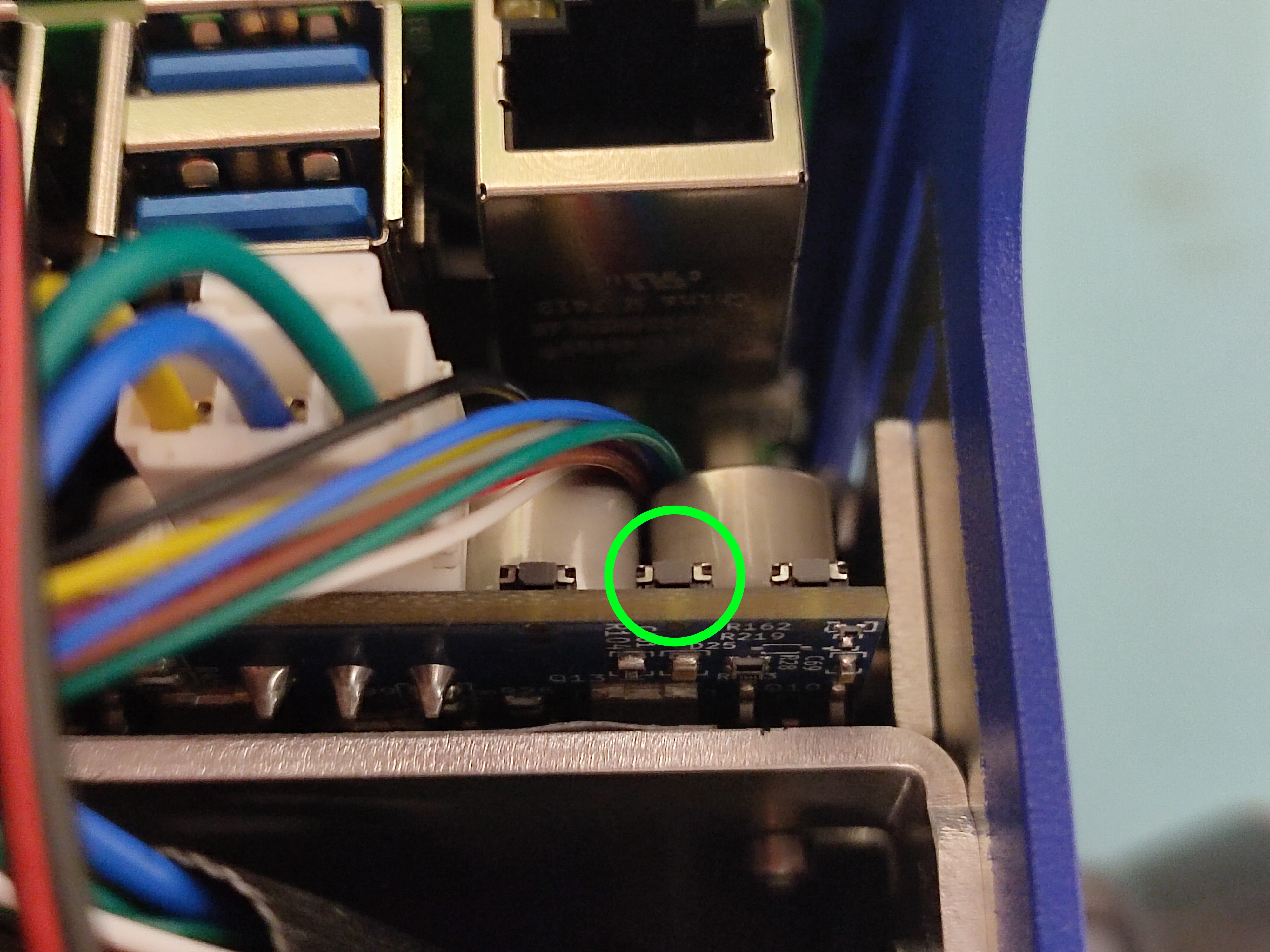
4. Enable the Drive
Once the MCB has been reset, you must manually enable the drive system.
First, ensure you have pressed the upper right-most physical switch . Or you can also execute the following service call:
ros2 service call /mcb/enable_drive std_srvs/srv/SetBool "{data: true}"
If the wheels are off the ground, they should now respond to the new control parameters.
Commonly Modified Parameters
All parameters below are under the /mcb node.
Kinematic settings
These define the physical limits of the robot’s motion. Increasing acceleration makes the robot more responsive but may cause jerking or slipping.
drive.movement.max_lin_accel_mm_s2: Maximum linear acceleration (default is often 500).drive.movement.max_rot_accel_mrad_s2: Maximum rotational acceleration.drive.movement.max_lin_speed_mm_s: Maximum linear speed.
Motor Calibration
If your motors are not “locking” or holding position properly during startup calibration, you may need to increase the calibration current.
drive.motors.encoder_calib_current_A: The current used during encoder calibration.Tip
If you find that the calibration fails to lock the motors sometimes, try increasing this value (e.g., to
2.5).
PID Position Control
These coefficients control the PD position controller for the motors.
drive.pid.position.p: Proportional coefficient.drive.pid.position.d: Derivative/Differential coefficient.
Note
Changes made via ros2 param set are persistent and will remain set until changed again. Once you have found the ideal settings, you should ensure they are correctly reflected in your permanent configuration files if necessary.